Part 2 of 4
First launch & interop generation
The one launch that does the heavy lifting: BepInEx reads the game's 61 MB IL2CPP binary and generates its interop assemblies. Here's what it looks like, how long it takes, and how to verify it worked.
BepInEx can't work with an IL2CPP game directly — the game's C# was compiled down to native code in
GameAssembly.dll. So on its very first launch, BepInEx runs
Cpp2IL over that ~61 MB binary and has Il2CppInterop generate a
folder full of managed "interop" assemblies that plugins like UngodlyGFX talk to. It happens once,
and then never again until the game updates.
-
Launch the game normally through Steam
No special shortcuts, no launch options, no running as administrator — just press Play. The doorstop proxy does the rest automatically.
-
Expect a quiet minute (or five) — this is the generation step
While interop generation runs, the game can look like it isn't starting: no window, or a black window, while your CPU quietly works. That's normal. On a modern machine it typically takes one to five minutes; older CPUs can take longer.
Because this package pre-seeds the Unity 2021.3.25 base libraries in
BepInEx\unity-libs, the usual "downloading unity libs" phase is skipped entirely — first launch needs no internet connection at all. -
Reach the title screen, then quit
Once generation finishes, the game boots as usual and lands on the title screen. That's the finish line for this part — quit the game so we can verify the results.
Verify: what BepInEx\ looks like after the first run
Open the BepInEx folder inside the game directory. Alongside the core,
patchers, plugins and unity-libs folders you installed,
the first launch should have created four new things. Click to inspect:
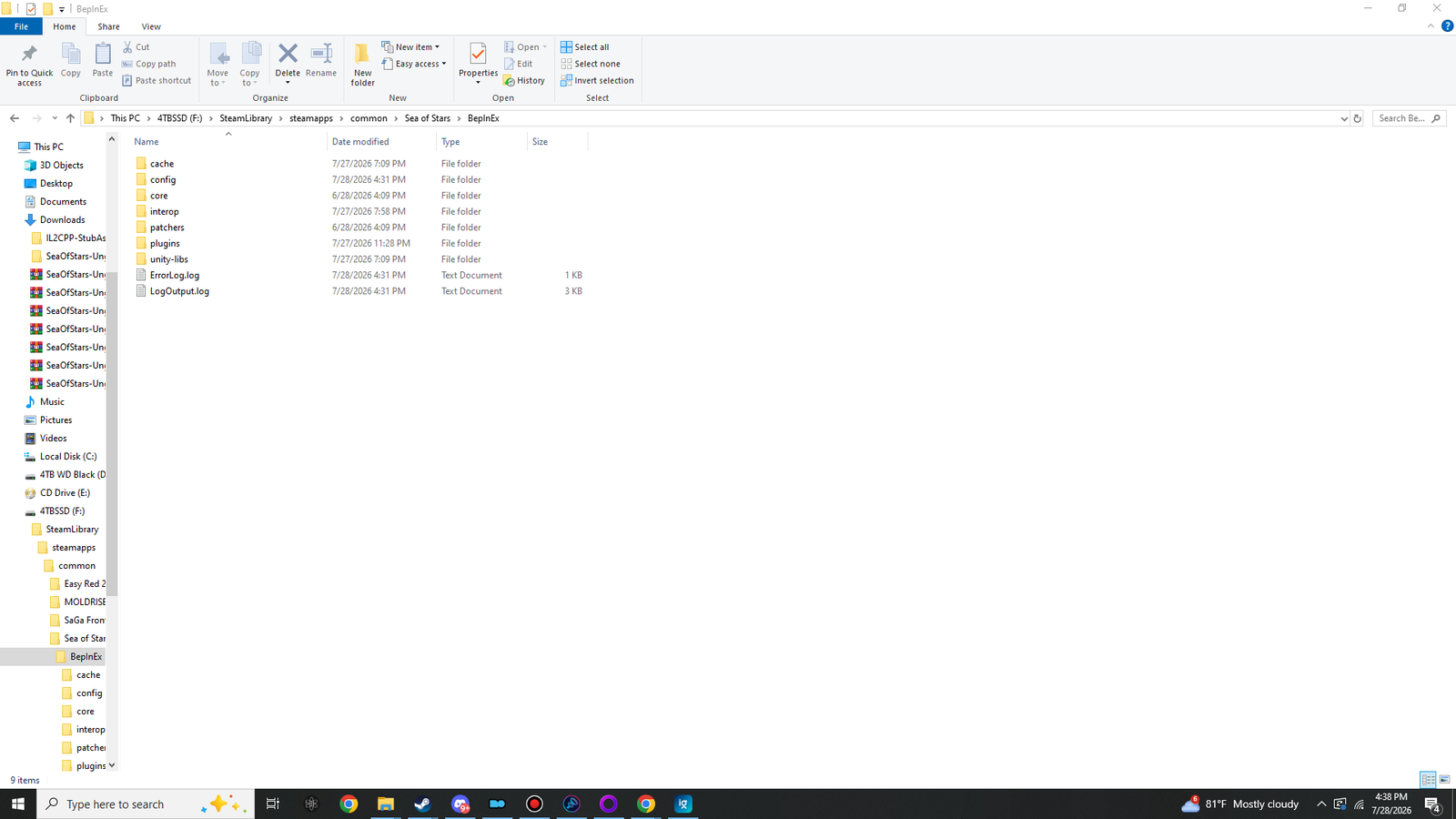
BepInEx folder after a successful first launch — cache, config, interop and the log files are all freshly generated.| Item | Expect |
|---|---|
interop\ | The big one. Hundreds of generated DLLs (Il2Cpp*.dll, UnityEngine.*.dll, the game's own assemblies). If this folder exists and is well-populated, generation succeeded. |
cache\ | Cpp2IL's working cache. Lets later launches skip straight to the game. |
config\BepInEx.cfg | The framework's own config, generated with defaults. You don't need to touch it for this guide. |
LogOutput.log | The full BepInEx log for the most recent launch — your best friend whenever anything misbehaves. |
ErrorLog.log | May appear alongside it; only worth reading if something actually went wrong. |
The thirty-second log check
Open BepInEx\LogOutput.log in Notepad. Near the very top you should see the framework
announce itself and, further down, report that the chainloader came up with nothing to load —
which is exactly right, since the plugins arrive in Parts 3–4:
[Message:   BepInEx] BepInEx 6.0.0-be.785 - SeaOfStars ...
...
[Info : BepInEx] 0 plugins to loadOn to the fun part — Part 3: installing UngodlyGFX.